[{"id":5,"description":"A super simple introduction to help you get started!","docUrl":"/curriculum/js0/primitive_data_and_operators","githubUrl":"","videoUrl":"https://www.youtube.com/watch?v=H-eqRQo8KoI&list=PLKmS5c0UNZmewGBWlz0l9GZwh3bV8Rlc7&index=1","order":0,"title":"Foundations of JavaScript","createdAt":"2018-05-29T02:04:31.733Z","updatedAt":"2022-07-24T15:32:02.762Z","chatUrl":"https://discord.gg/9kyfb86DYp","slug":"js0","challenges":[{"id":107,"description":"Write a function that takes in 2 numbers and returns their sum.\n\nHere's how another developer might use your function:\n\n```\nsolution(5,9) // Should return 14\nsolution(4,1) // Should return 5 \n```","title":"Sum of 2 Numbers","order":1,"createdAt":"2018-06-08T04:09:50.475Z","updatedAt":"2021-02-23T22:51:40.812Z","lessonId":5},{"id":108,"description":"Write a function that takes in 3 numbers and returns their sum.\n\nHere's how another developer might use your function:\n\n```\nsolution(5,9,2) // Should return 16\nsolution(4,1,9) // Should return 14\n```","title":"Sum of 3 Numbers","order":2,"createdAt":"2018-06-08T04:10:21.825Z","updatedAt":"2019-02-17T00:49:09.771Z","lessonId":5},{"id":105,"description":"Write a function that takes in a number and returns true if that number is greater than 5. Otherwise, return false.\n\nHere's how another developer might use your function:\n\n```\nsolution(9) // Should return true\nsolution(4) // Should return false\n```","title":"Greater than 5","order":3,"createdAt":"2018-06-08T04:08:30.674Z","updatedAt":"2019-02-17T00:49:29.722Z","lessonId":5},{"id":127,"description":"Write a function that takes in 2 numbers and return the largest out of them.\n\nHere's how another developer might use your function:\n\n```\nsolution(5,9) // Should return 9\nsolution(4,1) // Should return 4\n```\nNote: Try to implement your solution without the Math.max function","title":"Biggest Num out of 2","order":4,"createdAt":"2018-06-19T16:16:25.145Z","updatedAt":"2021-06-25T13:21:02.503Z","lessonId":5},{"id":106,"description":"Write a function that takes in 3 numbers and return the largest out of them.\n\n\nHere's how another developer might use your function:\n\n```\nsolution(5,9,14) // Should return 14\nsolution(4,5,1) // Should return 5\n```\n\nNote: Try to implement your solution without the Math.max function","title":"Biggest Num Out of 3","order":5,"createdAt":"2018-06-08T04:09:06.649Z","updatedAt":"2021-06-25T13:20:49.570Z","lessonId":5},{"id":109,"description":"Write a function that takes in 2 numbers and returns true if the first number is greater than the second, false otherwise.\n\nHere's how another developer might use your function:\n\n```\nsolution(5,9) // Should return false\nsolution(4,1) // Should return true\n```","title":"Is First Num Bigger","order":6,"createdAt":"2018-06-08T04:11:05.998Z","updatedAt":"2019-02-17T00:50:44.611Z","lessonId":5},{"id":110,"description":"Write a function that takes in 2 numbers and returns true if their sum is greater than 10.\n\nHere's how another developer might use your function:\n\n```\nsolution(5,9) // Should return true\nsolution(4,1) // Should return false\n```","title":"Is Sum > 10","order":7,"createdAt":"2018-06-08T04:11:39.695Z","updatedAt":"2019-02-17T00:52:24.440Z","lessonId":5},{"id":101,"description":"Takes in 2 numbers, return a function that returns the sum when the function is called \n\nExample:\n\n```\nconst a = solution(5,6) // a is a function, and a() will return 11\n```","title":"Functional Sum","order":8,"createdAt":"2018-06-08T04:04:42.957Z","updatedAt":"2019-01-28T11:54:46.526Z","lessonId":5},{"id":102,"description":"Write a function that takes in 2 numbers, return a function that takes in a number that returns the sum of all 3 numbers when called. \nExample:\n\n``` \nconst a = solution(1,2); // a is a function\n// a(1) returns 4 because 1+2+1\n// a(5) returns 8 because 1 + 2 + 5 \n// a(2) returns 5 because 1 + 2 + 2\n```","title":"Functional 3 Sum","order":9,"createdAt":"2018-06-08T04:05:54.554Z","updatedAt":"2019-01-28T11:54:46.524Z","lessonId":5},{"id":104,"description":"Write a function that takes in 2 functions and returns the sum of the result of the 2 functions\nExample:\n\n```\nconst a = () => { return 5; }\nconst b = () => { return 6; }\nconst c = solution(a, b) // c should be 11 because a() + b()\n```","title":"Functional Sums","order":10,"createdAt":"2018-06-08T04:07:39.225Z","updatedAt":"2019-01-28T11:54:46.528Z","lessonId":5}],"modules":[{"id":5,"createdAt":"2022-10-03T18:28:13.605Z","updatedAt":"2022-10-03T20:48:59.835Z","authorId":19,"lessonId":5,"name":"Numbers","content":"Learn how to do addition, subtraction, multiplication, division, and other useful number operations.","order":1},{"id":6,"createdAt":"2022-10-03T20:49:26.819Z","updatedAt":"2022-10-03T20:49:26.819Z","authorId":19,"lessonId":5,"name":"Strings","content":"Learn how to work with strings.","order":2}]},{"id":2,"description":"Learn how to solve simple algorithm problems recursively with the following exercises","docUrl":"/curriculum/js1/hypertext_markup_language","githubUrl":"","videoUrl":"https://www.youtube.com/watch?v=H-eqRQo8KoI&list=PLKmS5c0UNZmewGBWlz0l9GZwh3bV8Rlc7&index=1","order":1,"title":"Variables & Functions","createdAt":"2018-05-29T02:04:31.732Z","updatedAt":"2021-09-09T18:06:58.968Z","chatUrl":"https://discord.gg/cUvT2qQ7JE","slug":"js1","challenges":[{"id":146,"description":"Write a function called solution that takes in a number and returns a function. \n\nwhenever the returned function is called, the next incremental number will be returned\n\nExample:\n\n``` \nlet resf = solution(5)\nresult = resf() // 6\nresult = resf() // 7\n\nresf = solution(-5)\nresult = resf() // -4\nresult = resf() // -3\n```","title":"Incremental Closure","order":1,"createdAt":"2018-07-05T07:52:34.854Z","updatedAt":"2019-12-12T16:56:09.538Z","lessonId":2},{"id":145,"description":"Write a function called solution that takes in 2 parameters, a number and a function, and returns a function\n\nThe returned function can only be called the input number of times.\n\nWhenever the returned function is called, it returns whatever the input function returns. \nAfter the returned function has been called up to the first parameter number of times, calling returned function will always return null. \n\n```\nresf = solution(3, () => {\n return \"hello\"\n})\nresult = resf() // \"hello\"\nresult = resf() // \"hello\"\nresult = resf() // \"hello\"\nresult = resf() // null\n...\nresult = resf() // null\n\nresf = solution(1, () => {\n return 100\n})\nresult = resf() // 100\nresult = resf() // null\n...\nresult = resf() // null\n```","title":"Closure x times","order":2,"createdAt":"2018-07-05T07:52:05.784Z","updatedAt":"2019-11-01T23:25:46.038Z","lessonId":2},{"id":143,"description":"Write a function called solution that takes in 2 parameters, a number and string and returns the string repeated input parameter number of times\n\n```\nresult = solution(3, \"abc\") // \"abcabcabc\"\nresult = solution(0, \"hello\") // \"\"\n```\n\nReminder for students with prior experience: you are not allowed to use `for` and `while` loops. [Reason](https://www.notion.so/garagescript/Recursion-973993e8ed144d8a87cb5695fd1ea8b1)","title":"Repeated String","order":3,"createdAt":"2018-07-05T07:38:11.632Z","updatedAt":"2020-06-07T04:00:21.053Z","lessonId":2},{"id":82,"description":"Write a function called solution that takes in a function. \n\nThe function will be called with increasing indexes (starting from 0) until the input function returns false\n\n```\nsolution((e) => {\n // this function will be run 7 times with e: 0,1,2,3,4,5,6\n return e < 6\n})\n\nsolution((e) => {\n // this function will be run 1 time with e: 0\n return false\n})\n\nsolution((e) => {\n // this function will be run 4 times with e: 0,1,2,3\n return e < 3\n})\n```\n\nReminder for students with prior experience: you are not allowed to use `for` and `while` loops. [Reason](https://www.notion.so/garagescript/Recursion-973993e8ed144d8a87cb5695fd1ea8b1)","title":"Calling input function","order":4,"createdAt":"2018-06-08T02:34:12.116Z","updatedAt":"2020-08-19T19:15:56.677Z","lessonId":2},{"id":79,"description":"Write a function called solution that takes in 2 parameters, a number X and a function, and calls the function X number of times and then returns null.\n\nBasically, `solution` should run the user provided function X times.\n\n```\nsolution(88, () => { console.log('hello') }) // 'hello' should be printed out 88 times.\n\nsolution(9, () => { alert('hello') }) // alert('hello') should be ran 9 times.\n```\n\nReminder for students with prior experience: you are not allowed to use `for` and `while` loops. [Reason](https://www.notion.so/garagescript/Recursion-973993e8ed144d8a87cb5695fd1ea8b1)","title":"Call function X Times","order":5,"createdAt":"2018-06-08T02:27:40.927Z","updatedAt":"2020-06-07T04:00:37.329Z","lessonId":2},{"id":80,"description":"Write a function called solution that takes in a number and returns true if it's prime, false otherwise. \n\nA prime number is a number that is greater than 1, and not divisible by any number other than itself. \n\nThere are a number of approaches to do this, but the simplest is to start a number `i` at 2, and keep using `%` to check if the input number is divisible by i.\n\n```\nresult = solution(2) // true\nresult = solution(1) // false\nresult = solution(8) // false\nresult = solution(13) // true\n```\n\nReminder for students with prior experience: you are not allowed to use `for` and `while` loops. [Reason](https://www.notion.so/garagescript/Recursion-973993e8ed144d8a87cb5695fd1ea8b1)","title":"isPrime","order":6,"createdAt":"2018-06-08T02:31:12.651Z","updatedAt":"2020-06-07T04:00:45.835Z","lessonId":2},{"id":83,"description":"Write a function called solution that takes in 2 parameters, a string and a letter, and returns true if the character exists in the string, false if the character does not exist in the string. \n\n```\nresult = solution('abc', 'a') // true\nresult = solution('abc', 'd') // false\n```\n\nReminder for students with prior experience: you are not allowed to use `for` and `while` loops. [Reason](https://www.notion.so/garagescript/Recursion-973993e8ed144d8a87cb5695fd1ea8b1)","title":"Letter Find","order":7,"createdAt":"2018-06-08T02:35:12.138Z","updatedAt":"2020-06-07T04:00:52.413Z","lessonId":2},{"id":76,"description":"Write a function called solution that takes in 2 parameters, a string and a letter, and returns the number of times the character shows up in the string\n\n```\nresult = solution('abc', 'a') // 1\nresult = solution('bccbccb', 'b') // 3\n```\n\nReminder for students with prior experience: you are not allowed to use `for` and `while` loops. [Reason](https://www.notion.so/garagescript/Recursion-973993e8ed144d8a87cb5695fd1ea8b1)","title":"Letter Count","order":8,"createdAt":"2018-06-08T02:24:40.722Z","updatedAt":"2020-06-07T04:00:58.448Z","lessonId":2},{"id":77,"description":"Write a function called solution that takes in 2 parameters, a string and a function, and returns combined result of the function being called with every character in the string.\n\n```\nfun = (e) => {\n return '9'\n}\nresult = solution('hello', fun) // \"99999\"\n\nfun = (e) => {\n return e + '123'\n}\nresult = solution('blah', fun) // \"b123l123a123h123\"\n```\n\nReminder for students with prior experience: you are not allowed to use `for` and `while` loops. [Reason](https://www.notion.so/garagescript/Recursion-973993e8ed144d8a87cb5695fd1ea8b1)","title":"Letter Map","order":9,"createdAt":"2018-06-08T02:25:54.162Z","updatedAt":"2020-06-07T04:01:04.662Z","lessonId":2},{"id":144,"description":"Write a function called solution that takes in 2 parameters, a string and a function, and returns a function.\n\n1. When the returned function is called for the first time, the input function will be called with the first character of the string.\n\n2. When the returned function is called for the second time, the input function will be called with the second character of the string.\n\nAfter the input function is called with the last character of the string, calling the returned function will repeat #1, then #2, etc.\n\n```\nfun = solution('hel2', (e) => {\n console.log(e)\n})\nfun() // prints-> 'h'\nfun() // prints-> 'e'\nfun() // prints-> 'l'\nfun() // prints-> '2'\nfun() // prints-> 'h'\nfun() // prints-> 'e'\n```","title":"Letter Loop","order":10,"createdAt":"2018-07-05T07:38:34.659Z","updatedAt":"2020-01-31T01:41:21.764Z","lessonId":2},{"id":201,"description":"Write a function called solution takes in 2 parameters, a number and a function, and returns a function.\n\nWhen the returned function is called, the input function will execute after input number milliseconds.\n\n```\nfun = solution(1800, () => {\n console.log('hello')\n})\nfun() // 'hello' will be printed out 1800ms after this function is called\nfun() // 'hello' will be printed out 1800ms after this function is called\n```","title":"Delayed Closure","order":11,"createdAt":"2019-04-17T09:40:09.133Z","updatedAt":"2020-07-02T05:00:08.004Z","lessonId":2},{"id":200,"description":"Write a function called solution that takes in 2 parameters, a number and a function. \n\n1. solution should execute the input function (which returns a number) after first input parameter milliseconds. \n2. The input function should be run again after waiting the returned number of milliseconds\n\n```\nsolution(2000, () => {\n // This function will be run 2000ms after solution is called,\n // and after that, it will be run after another 3000ms\n console.log('hello')\n return 3000\n})\n```","title":"Delay 1 and 2","order":12,"createdAt":"2019-04-17T09:34:01.301Z","updatedAt":"2020-02-10T03:07:21.195Z","lessonId":2}],"modules":[]},{"id":1,"description":"These exercises will help you gain a better understanding of what it means for a data structure to be non-primitive.","docUrl":"/curriculum/js2/introduction_to_testing_inner_properties","githubUrl":"https://github.com/garageScript/curriculum/tree/master/curriculum/js2","videoUrl":"https://www.youtube.com/watch?v=rem796-hPY8&index=3&list=PLKmS5c0UNZmewGBWlz0l9GZwh3bV8Rlc7","order":2,"title":"Arrays","createdAt":"2018-05-29T02:04:31.731Z","updatedAt":"2021-09-09T18:26:41.240Z","chatUrl":"https://discord.gg/2NZwctzMXu","slug":"js2","challenges":[{"id":84,"description":"Write a function called solution that takes in a number and returns an array with the length equal to the input number.\n\nEvery element in the array must numbered with the correct index: 0,1,2,3,4...\n\n```\nsolution(5) // returns [0,1,2,3,4]\nsolution(3) // returns [0,1,2]\n```","title":"Array Generator","order":1,"createdAt":"2018-06-08T02:38:25.643Z","updatedAt":"2019-04-21T14:24:38.081Z","lessonId":1},{"id":85,"description":"Write a function called solution that takes in a function and returns an array. \n\nAs long as the input function returns false, array keeps growing with the index.\n\n```\nsolution((e) => {\n return e > 10\n}) // returns [0,1,2,3,4,5,6,7,8,9,10]\n\nsolution((e) => {\n return true\n}) // returns []\n\nsolution((e) => {\n return e % 7 === 0 && e !== 0\n}) // returns [0,1,2,3,4,5,6]\n```","title":"Array Callback Generator","order":2,"createdAt":"2018-06-08T02:39:05.991Z","updatedAt":"2019-04-21T14:23:52.885Z","lessonId":1},{"id":86,"description":"Write a function called solution that takes in 2 numbers and returns an array with the length equal to the first input number\n\nEvery element in the array is an array that is equal to the length of the second input number. All values in the array is 0.\n\n```\nsolution(5,2) // returns [[0,0], [0,0], [0,0], [0,0], [0,0]]\nsolution(3, 3) // returns: [ [0,0,0], [0,0,0], [0,0,0] ]\n```","title":"2D Array Generator","order":3,"createdAt":"2018-06-08T02:41:51.611Z","updatedAt":"2019-04-23T01:26:19.735Z","lessonId":1},{"id":87,"description":"Write a function called `solution` that does the following: \n\n```\nresf = solution([5,2,1,3], (e) => {\n return e+1\n})\nresf() // returns 6\nresf() // returns 3\nresf() // returns 2\nresf() // returns 4\nresf() // returns 6\n\nresf = solution([\"hello\", \"what\", \"a\", \"day\"], (e) => {\n if (e.length < 2) return \"\"\n return e\n})\nresf() // returns \"hello\"\nresf() // returns \"what\"\nresf() // returns \"\"\nresf() // returns \"day\"\nresf() // returns \"hello\"\nresf() // returns \"what\"\n...\n```","title":"Closure iterator","order":4,"createdAt":"2018-06-08T03:13:44.580Z","updatedAt":"2020-03-11T18:33:53.819Z","lessonId":1},{"id":88,"description":"Write a function called solution that takes in an array of functions and a number, and calls every function input milliseconds later\n\n```\nconst func = () => {\n console.log('hello')\n}\nsolution([func,func,func], 300) \n// console.log('hello') will be run 3 times, after 300ms\n```","title":"Delayed function calls","order":5,"createdAt":"2018-06-08T03:14:29.388Z","updatedAt":"2019-04-23T01:27:13.978Z","lessonId":1},{"id":89,"description":"Write a function called solution that that takes in an array of functions and a number, and calls each function input milliseconds after another\n\n```\nconst func = () => {\n console.log('hello')\n}\nsolution([func,func,func], 300) \n// console.log('hello') will be run after 300ms\n// console.log('hello') will be run after 300ms\n// console.log('hello') will be run after 300ms\n```","title":"Sequential delayed function calls","order":6,"createdAt":"2018-06-08T03:15:31.335Z","updatedAt":"2019-04-23T01:27:49.809Z","lessonId":1},{"id":90,"description":"Write a function called solution that replicates Array.prototype.forEach and call it cForEach\n\nCallback takes 3 input parameters, element, index and original array.\n[documentation](https://developer.mozilla.org/en-US/docs/Web/JavaScript/Reference/Global_Objects/Array/forEach)\n\n```\n[5,8,7].cForEach( (e, i, arr) => {\n console.log(e, i, arr)\n})\n// console.log will be called 3 times:\n// 5, 0, original array\n// 8, 1, original array\n// 7, 2, original array\n```","title":"cForEach","order":7,"createdAt":"2018-06-08T03:16:24.323Z","updatedAt":"2019-04-23T12:59:37.764Z","lessonId":1},{"id":130,"description":"Write a function called solution that replicates Array.prototype.map function and call it cMap\n\nCallback takes 3 input parameters, element, index and original array. \n[documentation](https://developer.mozilla.org/en-US/docs/Web/JavaScript/Reference/Global_Objects/Array/map)\n\n```\nresult = [5,8,7].cMap( (e, i, arr) => {\n console.log(e, i, arr)\n return e + i\n})\n// console.log will be called 3 times:\n// 5, 0, original array\n// 8, 1, original array\n// 7, 2, original array\n// result will be [5, 9, 9]\n```","title":"cMap","order":8,"createdAt":"2018-06-20T23:27:45.783Z","updatedAt":"2019-04-23T12:59:47.496Z","lessonId":1},{"id":129,"description":"Write a function called solution that replicates Array.prototype.reduce and call it cReduce.\n\nCallback takes 4 input parameters, accumulator, element, index and original array. \n[documentation](https://developer.mozilla.org/en-US/docs/Web/JavaScript/Reference/Global_Objects/Array/reduce)\n\n```\nresult = [5,8,7].cReduce( (acc, e, i, arr) => {\n console.log(acc, e, i, arr)\n return acc + e + i\n}, 'hi')\n// console.log will be called 3 times:\n// 'hi', 5, 0, original array\n// 'hi50', 8, 1, original array\n// 'hi5081', 7, 2, original array\n// result will be 'hi508172'\n```\n\nIt is best practice to pass in 2 arguments into `reduce` function. Therefore, for this challenge, you can assume that when your function, `cReduce`, will always be called with 2 arguments: a function and initial value.","title":"cReduce","order":9,"createdAt":"2018-06-20T23:27:05.780Z","updatedAt":"2020-05-25T02:53:48.751Z","lessonId":1},{"id":131,"description":"Write a function called solution that replicates Array.prototype.filter and call it cFilter.\n\nCallback takes 3 input parameters, element, index and original array. \n[documentation](https://developer.mozilla.org/en-US/docs/Web/JavaScript/Reference/Global_Objects/Array/filter)\n\n```\nresult = [5,8,7,6,9].cFilter( (e, i, arr) => {\n console.log(e, i, arr)\n return e % 2 === 0\n})\n// console.log will be called 5 times:\n// 5, 0, original array\n// 8, 1, original array\n// 7, 2, original array\n// 6, 3, original array\n// 9, 4, original array\n// result will be [8,6]\n```","title":"cFilter","order":10,"createdAt":"2018-06-20T23:29:03.585Z","updatedAt":"2020-02-26T11:50:33.585Z","lessonId":1},{"id":171,"description":"Write a function called solution that replicates Array.prototype.find and call it cFind.\n\nCallback takes 3 input parameters, element, index and original array. \n[documentation](https://developer.mozilla.org/en-US/docs/Web/JavaScript/Reference/Global_Objects/Array/find)\n\n```\nresult = [5,8,7].cFind( (e, i, arr) => {\n console.log(e, i, arr)\n return e % 2 === 0\n})\n// console.log will be called 2 times:\n// 5, 0, original array\n// 8, 1, original array\n// result will be 8\n```","title":"cFind","order":11,"createdAt":"2018-08-14T08:01:08.436Z","updatedAt":"2020-02-26T11:47:40.836Z","lessonId":1}],"modules":[]},{"id":4,"description":"These exercises will test your understanding of objects, which includes linked lists and trees","docUrl":"/curriculum/js3/preflight","githubUrl":"https://github.com/garageScript/curriculum/tree/master/curriculum/js3","videoUrl":"https://www.youtube.com/watch?v=Npn275pNXYw&index=4&list=PLKmS5c0UNZmewGBWlz0l9GZwh3bV8Rlc7","order":3,"title":"Objects","createdAt":"2018-05-29T02:04:31.733Z","updatedAt":"2021-09-09T18:28:53.393Z","chatUrl":"https://chat.c0d3.com/c0d3/channels/js3-objects","slug":"js3","challenges":[{"id":91,"description":"Given an array of strings (keys) and object, return a new array of values using the given array elements as keys to access the given object. \n\n```js\nsolution(['123', 'abc'], {123: 'hi', 345: 'world', abc: 'world'});\n// will return ['hi', 'world']\n```","title":"Return array of values","order":1,"createdAt":"2018-06-08T03:32:47.392Z","updatedAt":"2023-05-01T08:52:13.003Z","lessonId":4},{"id":92,"description":"Given 2 integers, create 2d arrays of objects. First integer represents the amount of nested arrays, 2nd integer represents the amount of objects within each nested array.\n\n```js\nsolution(3,2)\n// will return the following:\n[\n [{x: 0, y:0}, {x:1, y: 0}],\n [{x: 0, y: 1}, {x:1, y: 1}],\n [{x: 0, y: 2}, {x:1, y: 2}],\n]\n\nsolution(99,2)\n// will return the following:\n[\n [{x: 0, y:0}, {x:1, y: 0}],\n [{x: 0, y: 1}, {x:1, y: 1}],\n [{x: 0, y: 2}, {x:1, y: 2}],\n ...\n [{x: 0, y: 98}, {x:1, y: 98}],\n]\n```","title":"Create 2d Array of Objects","order":2,"createdAt":"2018-06-08T03:42:15.109Z","updatedAt":"2023-05-01T08:52:42.606Z","lessonId":4},{"id":96,"description":"Write a function called solution that takes in an array of strings and returns a function.\n\nreturned function will return an object with only keys that exist in the input array.\n\n```js\nconst resp = solution(['apollo', 'bella', 'cinderella'])\nconsole.log(resp({'apple': 25, 'apollo': 45, 'cindy': 84}))\n// will console.log this object: {\"apollo\": 45}\n\nconsole.log(resp({orange: 80, 'apollo': 95}))\n// will console.log this object: {'apollo': 95}\n\nconsole.log(resp({iron: 'man', billy: 'joel'}))\n// will console.log this object: {}\n```","title":"Return function from array of strings","order":3,"createdAt":"2018-06-08T03:57:55.158Z","updatedAt":"2023-05-01T08:53:30.981Z","lessonId":4},{"id":94,"description":"Write a function that takes in an array of numbers and a number, and returns true if any pairs add up to the number. (The numbers in the array is not unique, meaning there may be duplicate numbers)\n\n```js\nsolution([1,2,22,333,23], 25) // returns true\nsolution([1,2,22,333,23], 24) // returns true\n```","title":"2 sum","order":4,"createdAt":"2018-06-08T03:56:04.783Z","updatedAt":"2023-05-01T09:07:58.238Z","lessonId":4},{"id":93,"description":"Given object of key-string values and an object of key - function values, call the functions in 2nd object (if possible) using the values in 1st object as function params. Return new object.\n\n```javascript\nsolution ({\n \"name\": \"drake\",\n \"age\": \"33\",\n \"power\": 'finessing',\n \"color\": \"platinum\"\n}, {\n \"name\": (e) => { return e + \"kendrick\" },\n \"power\": (e) => { return \"motivating\" + e }\n});\n\n// will return : \n {\n \"name\": \"drakekendrick\",\n \"age\": \"33\",\n \"power\": \"motivatingfinessing\",\n \"color\": \"platinum\"\n }\n```","title":"Function call between Objects","order":5,"createdAt":"2018-06-08T03:55:23.967Z","updatedAt":"2020-06-09T20:32:42.915Z","lessonId":4},{"id":95,"description":"Write a function that takes in an array of numbers, and returns a new array of all duplicate numbers.\n\n```js\nsolution([1, 2, 2, 3, 1]) // should return [1, 2]\nsolution([1, 1, 1, 1, 2, 3, 3]) // should return [3, 1]\n```\n","title":"Duplicate Numbers","order":6,"createdAt":"2018-06-08T03:56:56.427Z","updatedAt":"2023-05-01T08:52:01.374Z","lessonId":4},{"id":97,"description":"Write a map function for objects\n\n```js\nconst info = {\n ironman: 'arrogant',\n spiderman: 'naive',\n hulk: 'strong',\n}\nconst result = info.map( (key, value, i) => {\n return key + i + value\n})\nconsole.log(result)\n\n// will print out ['ironman0arrogant', 'spiderman1naive', 'hulk2strong']\n```","title":"Map Objects","order":7,"createdAt":"2018-06-08T03:58:37.988Z","updatedAt":"2023-05-01T09:08:11.594Z","lessonId":4},{"id":98,"description":"Write a function that takes in an object and a number (milli-seconds). \n\n * you must call each function value of the object: \n * Given an object: `{\"nVal\": (k) => {...}}`\n * `{\"nVal\": (k) => {...When this function runs, k is \"nVal\"...}}`\n\n```js\nconst a = {\n \"jayZ\": (key) => console.log(key),\n \"tupac\": (key) => console.log(key + 2),\n \"name3\": (key) => console.log(key === \"name3\"),\n \"level\": (key) => console.log(key + key + key)\n}\nsolution(a, 500)\n\n// should print out: \n\"jayZ\"\n... 500 millieseconds later...\n\"tupac2\"\n...500 millieseconds later...\n\"true\"\n...500 millieseconds later...\nlevellevellevel\n```","title":"Call function values of an Object","order":8,"createdAt":"2018-06-08T03:59:21.731Z","updatedAt":"2023-05-01T08:53:25.370Z","lessonId":4},{"id":99,"description":"Create a JavaScript file `9.js` so that when you run it with `node 9.js`, the computer will output an HTML file `9.html` that displays each pokemon's name and image. There cannot be any JavaScript in the generated html file. \n\n1. Send a request to [https://pokeapi.co/api/v2/pokemon/](https://pokeapi.co/api/v2/pokemon/). \n2. Look at the response, you will notice that each pokemon has a url. You need to send another request for each pokemon to get the image url. It is located under `sprites` key of the object.\n3. Use the responses to create an HTML string to display the name and pokemon's image. \n4. Write the resulting string into a file using `fs.writeFile` \n\nThe `img` tag with the `src` attribute are instructions for the browser to get the image data from the url and display it. For example: put this tag into an html file to display a picture of a cat.\n\n``","title":"Send a request","order":9,"createdAt":"2018-06-08T04:00:03.015Z","updatedAt":"2021-03-07T10:16:17.807Z","lessonId":4},{"id":100,"description":"Send a request to https://pokeapi.co/api/v2/pokemon/ and create [a Pokemon Viewer](https://songz.c0d3.com/js3/pokeview.html). Have the viewer include previous and next buttons at the top of the page, and display 20 images and names of pokemon per page. ","title":"Build this Pokemon Viewer","order":10,"createdAt":"2018-06-08T04:00:40.168Z","updatedAt":"2023-05-01T08:53:12.363Z","lessonId":4}],"modules":[]},{"id":24,"description":"Create challenging front-end mini-projects and build an understanding of Web Development. Covers the last fundamental JavaScript concept: (Complex Objects)","docUrl":"/curriculum/js4/interactive_elements","githubUrl":"","videoUrl":"","order":4,"title":"Front End Engineering","createdAt":"2018-08-06T19:18:33.458Z","updatedAt":"2021-09-09T18:31:15.466Z","chatUrl":"https://chat.c0d3.com/c0d3/channels/js5-htmlcssjs","slug":"js4","challenges":[{"id":177,"description":"Create a smart watch UI. [Demo](https://www.c0d3.com/challenges/watch.html)\n\n1. To embed an iFrame of google maps, go to [google maps](https://www.google.com/maps) and search for a location. Then click on the hamburger menu on the left and select `share or embed map`. Copy the embed iframe code.\n\n2. The watch asset is located in [https://c0d3.com/challenges/assets/watch.jpg](https://c0d3.com/challenges/assets/watch.jpg). Watch image is `600x800` pixels, Font size for Time: `5em` with margin-top of `30px`. Day and date are simple `h2` tags.\n\n4. **Acceptance Criteria** Make sure to pick a specific location so the red marker shows up!\n * When user clicks anywhere on the white background that has the time, the white background must slide up. On another click, it must slide back down and toggle back and forth based on user clicks.\n * The info box (including direction and rating etc.) should not appear (because it doesn't fit the screen and it creates a bad user experience). The solution is pure css, you do not have to do anything with the iframe.\n * When the page loads, the time must reflect the current time (does not have to update)\n\n5. Steps and Points:\n * (20 points) Make a watch show up on the bottom left of the page.\n * (20 points) Create a div that is positioned where the watch face is supposed to be.\n * (30 points) Put in the map and the content that slides up and down when clicked.\n * (30 points) Add in the JavaScript to get the correct date. \n\nSample Code:\n\n```\nconst d = new Date();\n[\"Sunday\", \"Monday\", \"Tuesday\", \"Wednesday\", \"Thursday\", \"Friday\", \"Saturday\"][d.getDay()]; // Get Day\n[\"January\", \"February\", \"March\", \"April\", \"May\", \"June\",\n\"July\", \"August\", \"September\", \"October\", \"November\", \"December\"][d.getMonth()]; // Get Month\n```","title":"Smart Watch UI","order":1,"createdAt":"2018-08-21T01:42:04.935Z","updatedAt":"2020-12-11T13:20:33.774Z","lessonId":24},{"id":178,"description":"Create a file rating component. [Demo](https://www.c0d3.com/challenges/stars.html) \n**Hint** If you notice the selected stars growing larger than the other stars, it is simply an effect of adding a 3px border so that when you apply a color you can still see the stars clearly. Css:\n\n```\n -webkit-text-stroke-width: 3px;\n -webkit-text-stroke-color: black;\n```\n\n* You need to add a free, open-source, font library called [font-awesome](https://fontawesome.com/how-to-use/on-the-web/setup/getting-started?using=web-fonts-with-css). Add the css file from their cdn (content delivery network) or use [this stylesheet ](https://use.fontawesome.com/releases/v5.2.0/css/all.css) you should be able to create basic star icons with `` and stuffed star icons with ``\n\n* **Acceptance Criteria** All stars mentioned here is an example. Please do not hardcode.\n - Hover over the 4th star. Go straight down out of the div (so that all 4 stars are still selected). Go straight up on the 2nd star, then go straight down. Only stars 1 and 2 should be selected.\n - Click on the 4th star. When you hover over the other stars (without leaving the div), the current selection should not change.\n - Click on the 4th star. Then click on the 2nd star. Only stars 1 and 2 should be selected.\n - Click on the 4th star. When you move mouse out of the stars container and move mouse back in, you should be able to resume selection as normal.\n\n* **Steps and Points** \n - (10 points) Get 5 stars to show up on the HTML. \n - (20 points) Create a class function for each star, replace 5 stars in step one (html) by creating an array of stars objects.\n - (35 points) Add hover functionality to highlight the appropriate stars.\n - (35 points) Solve click functionality and text.","title":"Stars UI","order":2,"createdAt":"2018-08-21T08:42:21.980Z","updatedAt":"2020-12-11T13:20:48.382Z","lessonId":24},{"id":179,"description":"Recreate a Google Doodle of the First World's Fair. [Demo](https://www.c0d3.com/challenges/fair.html) \n\n* You are given three images: [Small Image](https://c0d3.com/challenges/assets/fair/small.jpg), [Large Image](https://c0d3.com/challenges/assets/fair/big.jpg), [Scope](https://c0d3.com/challenges/assets/fair/scope.png) to create the experience.\n\n* **Acceptance Criteria** is pretty straightforward.\n - Recreate the demo experience, make sure the main functionality works.\n - Image must be centered in the page.\n - Make sure the area that is magnified is accurate to where the cursor is supposed to be.\n - Make sure the cursor does not show up in the magnified experience because it creates a bad user experience.\n\n* **Steps and Points** \n - (35 points) Get the small image to show, and a circular div that moves when the mouse is over the image.\n - (50 points) Map the position of the mouse to the background position of the div and display magnified div.\n - (15 points) Add scope image to the div.\n\n* **Hint**\n - You need the `css` property `pointer-events: none;` on the scope so your mouse events go directly to the small image. Without it, your mouse movement may not be smooth and the scope may only update when your mouse moves out of the scope.","title":"Google Fair","order":3,"createdAt":"2018-08-21T09:47:05.171Z","updatedAt":"2020-12-11T13:21:14.384Z","lessonId":24},{"id":158,"description":"Create a simple game. [Demo](https://c0d3.com/challenges/lightsoff/lightsoff.html) \n\n**Hint** The game starts with one light turned on. When you click on it, it toggles (therefore turning off), and its surrounding lights (up, down, left right) will also toggle. The game ends when all the lights are turned off.\n\n* **Acceptance Criteria** \n - You should detect when game is over (all lights are off). \n - At the end of the game, user should be able to input a new size for the board and replay the game. \n\n* **Steps and Points** \n - (40 points) Create a 2D array of Block objects that displays blocks on the page.\n - (20 points) When a lit block is clicked, trigger neighbors to toggle (if already lit up, then make it light off; if already lit off, then make it light up) (using the 2D array). When a non lit block is clicked, nothing happens.\n - (20 points) Add a check for game to be over.\n - (20 points) Wrap code into a create game function.","title":"Lights Off","order":4,"createdAt":"2018-08-06T22:27:30.347Z","updatedAt":"2021-01-08T17:43:09.690Z","lessonId":24},{"id":155,"description":"Create a task board with the following [css specs](https://raw.githubusercontent.com/garageScript/c0d3/master/public/challenges/assets/kanban.png). \n[Demo](https://c0d3.com/challenges/kanban/kanban.html) \nMake sure to try out the undo functionality on the bottom right of the page. \n\n* **Acceptance Criteria** This should be a fully functional KanBan board.\n - Users should be able to add todos, click on each todo to have an option to delete it, and move items between boards.\n - You should be storing todo list into localStorage so that when your users revisit the board, they will see their items.\n - You should support an undo button so that users can undo their actions. Undo functionality does not have to persist between sessions. \n\n* **Steps and Points** \n - (15 points) Create HTML (with sample todo) for the board.\n - (15 points) Style your html elements to make sure your board is pixel perfect.\n - (15 points) Convert your html into function objects, so that when submit is clicked todos are added.\n - (20 points) Implement delete, right / left functionality.\n - (20 points) Implement localStorage\n - (15 points) Implement undo.","title":"Kanban Board","order":5,"createdAt":"2018-08-06T20:19:14.384Z","updatedAt":"2020-12-11T13:21:31.924Z","lessonId":24},{"id":156,"description":"* **Build a selection box** \n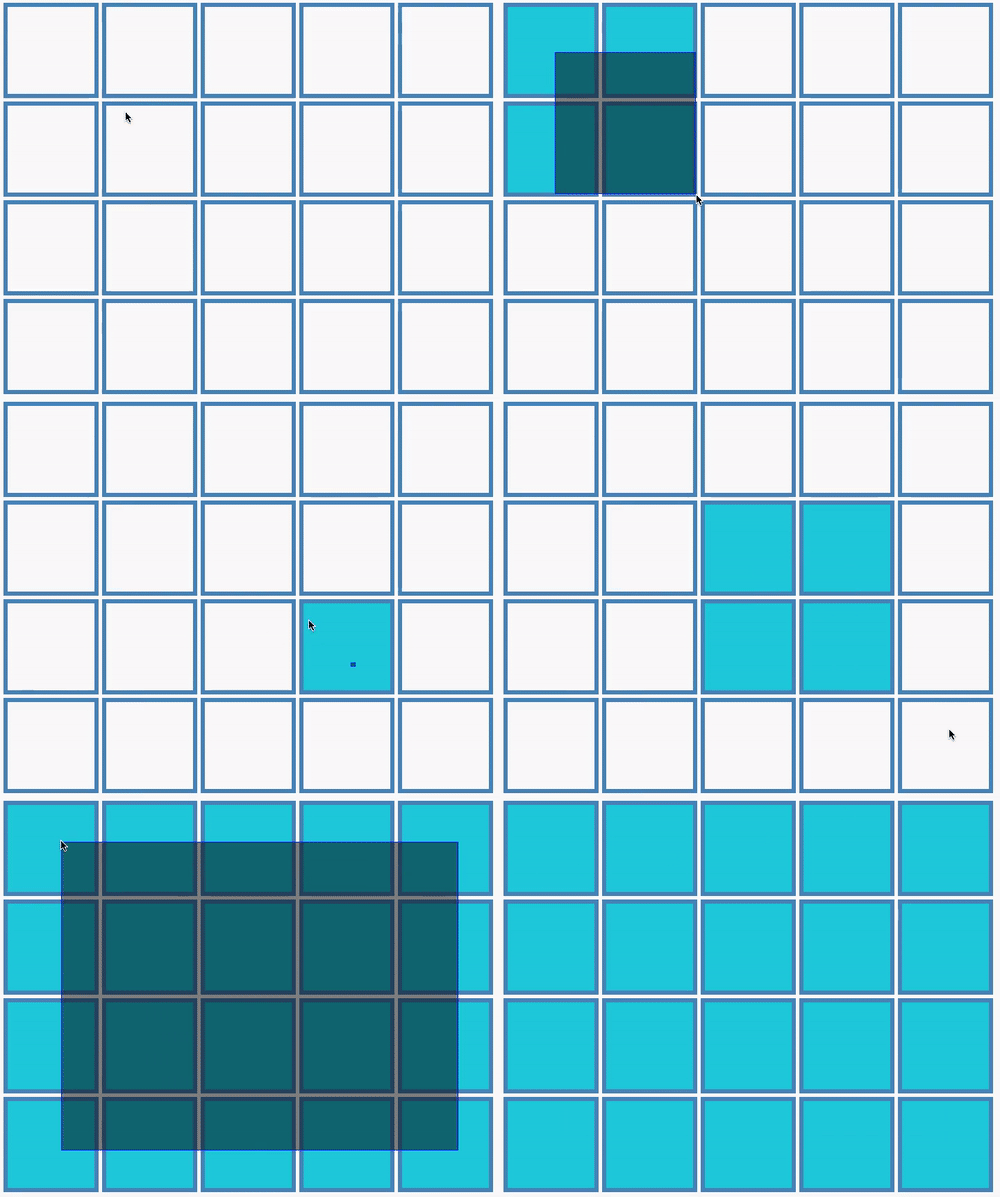\n\n* **Acceptance Criteria** \n - Once you click and drag, area that the mouse covered turn grey, and boxes selected turn blue.\n - Once you release the mouse, boxes selected stay blue and grey area disappear.\n\n* **Steps and Points (select)** \n - (20 points) Create a box class and use that to create a 2D array to display a nxn box. (here you can have n=5)\n - (40 points) Implement the coloring of the boxes as you drag.\n - (40 points) Implement the grey area (with opacity) as you drag.\n\n**or**\n\n* **Create a simple snake&food game** [Demo](https://c0d3.com/challenges/snake/snake.html) \n**Hint** If you think about it, you need an object called block. A food is a block, a snake is made up of a chain of blocks (linkedList) . \n\n* **Acceptance Criteria** \n - You should detect when game is over (snake hit a wall or onto itself). \n - User should be able to change direction of the snake with arrow keys. \n - Use a linked list for efficiency \n","title":"Select or Snake","order":6,"createdAt":"2018-08-06T20:29:30.118Z","updatedAt":"2021-01-12T13:19:32.404Z","lessonId":24},{"id":157,"description":"Create a game called MineSweeper [Demo](https://c0d3.com/challenges/mine/mine.html) \n\n* **Acceptance Criteria** \n - Generate a 10x10 board. There should be 10 bombs hidden within the board. \n - If user clicks on a bomb, they lose. If not, the box reveals a number. This number represents how many bombs there are in the 8 boxes surrounding it. (Therefore it is not possible to have a number greater than 8)\n - If the revealed number is 0, reveal all 8 boxes around the 0. If any of the revealed boxes are also 0, reveal all the unrevealed 8 boxes around them and recursively continue.\n - Users should be able to `ctrl+click` or right click on a box to flag it as a potential bomb, but they can still click on it \n - Game ends when all the non-bomb boxes are revealed. \n - At the end of the game, user should be able to replay the game. \n\n* **Steps and Points** \n - (15 points) Create a box class and use that to create a 2D array to display a nxn box.\n - (15 points) Write a function that randomly makes n boxes with a bomb inside, and add logic to end the game once a bomb is clicked.\n - (15 points) Write a function that returns the array of neighbors when you click on a non-bomb box, then display the number of bombs around that box.\n - (25 points) Recursively call surrounding boxes when its count is 0.\n - (15 points) Write function to check if user has won (number of revealed boxes + bombs) should equal nxn.\n - (15 points) Polish (like control-click to label).","title":"MineSweeper","order":7,"createdAt":"2018-08-06T21:19:55.645Z","updatedAt":"2020-12-11T13:22:16.692Z","lessonId":24}],"modules":[{"id":1,"createdAt":"2022-06-07T19:16:11.532Z","updatedAt":"2022-06-07T19:16:11.532Z","authorId":3060,"lessonId":24,"name":"testing","content":"testing","order":0},{"id":2,"createdAt":"2022-06-07T19:53:30.716Z","updatedAt":"2022-06-07T19:53:30.716Z","authorId":3060,"lessonId":24,"name":"testing01","content":"testing01","order":0},{"id":3,"createdAt":"2022-06-07T20:00:38.352Z","updatedAt":"2022-06-07T20:00:38.353Z","authorId":3060,"lessonId":24,"name":"testing2","content":"testing01","order":0},{"id":4,"createdAt":"2022-06-07T20:00:45.267Z","updatedAt":"2022-06-07T20:00:45.267Z","authorId":3060,"lessonId":24,"name":"testing3","content":"testing01","order":0}]},{"id":3,"description":"These exercises will help you build a strong understanding of how the web works.","docUrl":"/curriculum/js5/request_and_response","githubUrl":"","videoUrl":"","order":5,"title":"End To End","createdAt":"2018-05-29T02:04:31.733Z","updatedAt":"2021-09-09T18:32:16.790Z","chatUrl":"https://chat.c0d3.com/c0d3/channels/js4-endtoend","slug":"js5","challenges":[{"id":73,"description":"[Demo Link](https://js5.c0d3.com/location)\n\n1. Create a route `/visitors` that displays the Google map of where your visitors are and a list of the cities and the count of visits to this page.\n2. Create a route `/api/visitors` that sends back a JSON of all the visitors that have visited your site. \n3. Create a route `city/:cityName` that displays the Google map of one of the locations, a list of the cities, and the count of visits to this page.\n4. Make sure to use `x-forwarded-for` headers!\n\nUse the following API to get an estimate of where the user is coming from: \n`https://js5.c0d3.com/location/api/ip/ `\n\nTo send a request from your server, you need to use a fetch library like [node-fetch](https://www.npmjs.com/package/node-fetch)\n\nIf you do not want to spend money creating your own Google Maps API key, use ours! Write the source code of the demo site and then copy the script from the code into your own project:\n\n```\n\n```\n\nPlease make sure to include a frontend similar in functionality to the demo so that users can view and interact with the API.","title":"IP Geolocation","order":1,"createdAt":"2018-06-08T02:15:40.228Z","updatedAt":"2023-11-30T12:19:35.166Z","lessonId":3},{"id":72,"description":"[Demo Link](https://js5.c0d3.com/command.html)\n\n1. Create a route `/commands` that takes in an input box that lets you execute commands directly on your server. \n2. You must be able to see the response on the page. \n3. Use `execFile` or `spawn` function from Node's [`child_process` library](https://nodejs.org/api/child_process.html) to execute the command. \n4. To protect your code from malicious users, you should only allow these commands: `ls`, `cat`, `pwd`. \n\nP.S.: The `child_process` library also includes a `exec` function which takes a string containing the entire command to execute. This potentially may be used to trigger arbitrary command execution, and so, it's an unsafe alternative.\n\nPlease make sure to include a frontend similar in functionality to the demo so that users can view and interact with the API.","title":"Commands","order":2,"createdAt":"2018-06-08T02:15:12.412Z","updatedAt":"2023-11-30T12:20:02.731Z","lessonId":3},{"id":71,"description":"[Demo Link](https://js5.c0d3.com/imggen)\n\nCreate a url `/memegen/api/write some text here` that generates an image meme. \nUse the [jimp library](https://www.npmjs.com/package/jimp) to help you draw text into the image. \nAllow users to specify the following in the URL parameters:\n\n* blur - (Optional). Amount of pixels to blur by.\n* src - (Optional). URL for the meme image. If no url is provided, use https://picsum.photos/640/480/\n* greyscale (Optional). If true, draws the text in the image in grayscale.\n\nCache the last 10 images searched in memory so your server will return the images faster if it has been loaded before.\n\nExample:\n\n* https://js5.c0d3.com/imggen/api/great%20job?blur=4&greyscale\n\n\nUsing Jimp:\n\n* `Jimp.loadFont(....)` takes in a font variable and returns a promise. \n * For font, you can use a built in font like `Jimp.FONT_SANS_32_WHITE` or ...BLACK. \n * When the promise resolves, you get a `font` object.\n* `Jimp.read(...)` takes in a url and returns a promise \n * When the promise resolves, you get a `image` object.\n* Using your image object you can run these functions:\n * `image.print` takes in a font object, starting x position, starting y position, and the text you want to write.\n * `image.getBufferAsync` takes in a fileType and returns a promise.\n * For fileType, you can use the built in type `Jimp.MIME_JPEG`.\n * When the promise resolves, you get a `buffer` object. You can turn the buffer into a string and call `fs.writeFile` to create a meme file, but we don't want to create unnecessary files. We can simply send the buffer back as a response with `res.send(buffer)`\n\nMake sure to set the response `content-type` header to `image/jpeg` before sending back the response!","title":"Meme Gen","order":3,"createdAt":"2018-06-08T02:14:09.530Z","updatedAt":"2023-11-30T12:35:27.887Z","lessonId":3},{"id":70,"description":"[Demo Link](https://js5.c0d3.com/assetExercise/simple/)\n\nBuild APIs for powering the text editing site. Acceptance criteria:\n\n1. Listen to incoming `POST` requests to `/api/files` to create a file.\n2. Listen to incoming `GET` requests to `/api/files` to get the an array containing all the files.\n3. Listen to incoming `GET` requests to `/api/files/file-name` to get the content of file-name.\n\nNote: `fs.readdir` takes in an argument (the path of folder) and a function. The function will be called with 2 arguments (error, data) when computer finishes.\n\nTo prevent your server from getting filled up with junk files, your server must automatically delete files after a 5 minute mark for each file. \n\nPlease make sure to include a frontend similar in functionality to the demo so that users can view and interact with the API.","title":"Asset Creation","order":4,"createdAt":"2018-06-08T02:13:40.455Z","updatedAt":"2023-11-30T12:19:25.470Z","lessonId":3},{"id":69,"description":"[Demo Link](https://js5.c0d3.com/chatroom)\n\nFirst, you will use the same API that you used in JS5 Todo exercise section to check if user is logged in, signup a user, and get information about the user with this API:\n\n[https://js5.c0d3.com/auth/api/session](https://js5.c0d3.com/auth/api/session)\n\nPlease review the Todo exercise if you need to understand how it works and what API requests you must send.\n\nWhen the user goes to the site, send the request to your server with the `Authorization` header in the request. Your server sends the request to [the auth api](https://js5.c0d3.com/auth/api/session) to get information about your user. \n\nSample header\n```\nAuthorization: \"Bearer a-jwt-token\"\n```\n\nProvide the following APIs. Respond with a 403 status code if user is not not logged in. \n\n* GET `/api/session` - sends back the user information. The front end uses this to determine whether to render the login page or enter room page.\n* POST `/api/:room/messages` - Creates a new message in the room.\n* GET `/api/:room/messages` - Gets the messages in the room.\n\nNote: You should be using a middleware to set the user into the request object. \n\nIn this example, you are using a 3rd party user signup / login service to store your user's login credentials. In the industry, some companies choose not to implement their own signup / login services and use a third party service.\n\n\nPlease make sure to include a frontend similar in functionality to the demo so that users can view and interact with the API.","title":"Chatroom using JWT Auth","order":5,"createdAt":"2018-06-08T02:12:59.119Z","updatedAt":"2023-11-30T12:12:51.336Z","lessonId":3},{"id":125,"description":"[Demo](https://js5.c0d3.com/auth)\n\nBuild your own backend for authentication the same way that the authentication backend for chatroom works. It must support:\n\n* POST `/api/users` to create a new user\n * `password` field cannot be blank and must be > 5 letters\n * `username` field cannot be blank, only contains letters and numbers (alphanumeric), is unique\n * `email` field must contain @ symbol and must be unique\n * Users should be able to pass in any additional key/value data pairs in the body.\n* POST `/api/sessions` to create a new session (aka login a user)\n * `username` field can be either username or email.\n * `password` field must match the password for the user.\n* GET `/api/sessions` to get the currently logged in user. You must accept a json web token in the header field.\n\nTo generate a `jwt` token, use [jsonwebtoken](https://www.npmjs.com/package/jsonwebtoken) library. \n\n* `jwt.sign( {userId: 1234 }, 'secret password' )` - will return a secure jwt token.\n* `jwt.decode( token )` - will return the data in the token, which would be `{userId: 1234, iat: ...}` if encoded like the example above. `iat` field gives you the time (in seconds) when the token has been signed.\n\nMake sure you properly secure user passwords with [bcrypt](https://www.npmjs.com/package/bcrypt)","title":"Authentication","order":6,"createdAt":"2018-06-13T06:35:31.921Z","updatedAt":"2021-03-28T10:05:50.725Z","lessonId":3},{"id":132,"description":"[Demo](https://js5.c0d3.com/imageAnalysis)\n\n1. For file uploads, use a [library](https://github.com/expressjs/multer) called `multer`.\n2. To use multer, first create an upload object `upload = multer({ dest: 'files/' })`\n3. Next, pass your upload object into your post request as a middleware: `app.post('/files', upload.array('userFiles'), (req, res) => ...`\n3. After the middleware, you can access files in the request object: `req.files`\n\nAfter you can successfully upload the file, you need to pass each file into [Tesseract](https://tesseract.projectnaptha.com/) Library for text analysis. Since this will take time for each image, response status should be `202` and you should create and return a job url that the user can visit to view the status of the job.\n\nYou would need to provide an API `/api/job/:jobid` to lookup the status of each processed file. \n\nSample Tesseract Code\n\n```\nconst Tesseract = require('tesseract.js')\nTesseract.recognize( ..path to image file... , 'eng', { logger: console.log }).then( ... callback ...)\n```\n\nIf your application experiences crashes during the text recognition, you may have to delete the generated file `eng.traineddata`. \n\nPlease make sure to include a frontend similar in functionality to the demo so that users can view and interact with the API.","title":"Image Text Extraction","order":7,"createdAt":"2018-06-22T19:24:07.321Z","updatedAt":"2023-11-30T12:12:16.495Z","lessonId":3},{"id":133,"description":"In this challenge, you will be building an application where users can go to your website and [take a picture](https://js5.c0d3.com/examples/webcam).\n\n1. [Get user's webcam](https://developer.mozilla.org/en-US/docs/Web/API/MediaDevices/getUserMedia) by calling `navigator.mediaDevices.getUserMedia({...})`, which returns a promise.\n2. When the promise resolves, you will get the webcam video stream object in your callback. Make sure you have a `video` element to display the video, and set the video element's `srcObject` property to the video stream so users can see their video.\n3. When users click on the snap button, you need to draw the video into your canvas element to get an image of the video. To do this, first get the context (think of context as a paintbrush): `const context = canvas.getContext('2d')`. \n4. Then, draw the video by passing the video element into the drawImage function: `context.drawImage(video, 0, 0)`\n5. Next, you want to get the image data from context using `canvas.toDataURL()`\n5. The data returned looks like the following format: `data:image/png;base64,ENCODED_IMAGE_DATA`. Since we only want the ENCODED_IMAGE_DATA, we can delete the the metadata.\n6. Send the data to your server.\n6. When your server receives the data, you can simply write the image data into your server. Since the image is encoded as base 64, make sure you specify it: `fs.writefile(filePath, imgData, 'base64', () => {})`\n2. On your client page, make sure you request to the server for a list of images so users can see all the pictures that was ever taken by the site.","title":"Selfie Queen","order":8,"createdAt":"2018-06-23T05:01:27.064Z","updatedAt":"2021-04-13T07:29:09.996Z","lessonId":3},{"id":67,"description":"**Final Project**: Complete a chatroom\n\n1. When the user first goes to your site, send them to a simple login page that asks for a username (make sure to set a cookie!). Keep it simple this time, no need to create an account or use a password, only the username.\n2. After getting in, user should see his video and input box. When user types something and hits enter, his image and text will be sent to server.\n3. When server receives image data, it needs to decode the base64 image data to Buffer so the image can be manipulated: `const imageData = Buffer.from(req.body.data, 'base64');`\n4. Next, use `Jimp` just like in challenge 3 to draw the text onto the image and write it to file as `username.png`. Jimp can load an image from a buffer the same way it loads from an url: `Jimp.read(imageData)`.\n5. When the user types into the input box and hits enter again, the meme will be saved as `username.png`. Every user should always only have 1 image.\n6. When another person joins the room, they should see memes of everybody in the chatroom that updates in realtime. \n7. When you get this far, you will notice that images do not change even though the files have changed. This is because of browser caching. To bust the cache, you can add a date query params to the end of the image request, for example: `username.png?${Date.now}`.\n8. If you bust the cache this way, you will see that images are now always flickering. Flickering is happening because it takes the browser awhile to retrieve the image. To get around this problem, you should render all the images into an invisible div. When all the images are loaded, then show the invisible div and hide the current div. This way, users will see a smooth instantaneous update of the images.","title":"Create a MemeChat","order":9,"createdAt":"2018-06-08T02:11:43.441Z","updatedAt":"2020-11-17T14:20:02.010Z","lessonId":3}],"modules":[]},{"id":29,"description":"React and GraphQL Lessons","docUrl":"","githubUrl":"","videoUrl":"","order":6,"title":"React, GraphQL, SocketIO","createdAt":"2018-09-10T08:38:24.487Z","updatedAt":"2020-06-16T04:22:34.707Z","chatUrl":"https://chat.c0d3.com/c0d3/channels/js6-reactgqlsocketio","slug":"js6","challenges":[{"id":192,"description":"Create a server-side GraphQL endpoint that manages lessons, challenges, and pokemons!\n\n1. Install Apollo's server, so your server has the playground. [Follow the documentation](https://www.apollographql.com/docs/apollo-server/getting-started).\n2. Create `typedefs` for lessons and pokemon provided by [lessons api](https://www.c0d3.com/api/lessons) and [pokemon api](https://pokeapi.co/). `Typedefs` are the documentation for inputs and outputs of your app. Sample `typedef` provided below. Must match functionality of [existing documentation](https://studio.apollographql.com/sandbox/explorer?endpoint=https://js5.c0d3.com/js6c1/graphql)\n3. Create your resolver, which are functions that will run when a GraphQL request is received. Since your resolver will be asynchronous (you need to send request to other services), make sure it returns a promise!\n\nSample `Typedef`:\n\n```\nconst server = new ApolloServer({\n typeDefs: `\n type User {\n name: String\n }\n type Query {\n users: [User]\n }\n `,\n resolvers: {\n Query: {\n users: () => {\n return [{name: 'Terman Hong'}, {name: 'Kahul Ralra'}]\n }\n }\n }\n});\n```\n\nYou can test your GraphQL endpoint against the [example of how your queries would be used](https://js5.c0d3.com/js6/pokemonSearch.html) and change the following:\n\n1. Change `debounce` function argument to `300`ms. If you don't know what debounce is, ask in the chatroom!\n2. Change the GraphQL URL to your own server's URL.\n\n**Do not include the example front end code.**","title":"GraphQL Intro","order":1,"createdAt":"2018-09-10T08:41:54.085Z","updatedAt":"2023-01-10T15:35:33.492Z","lessonId":29},{"id":193,"description":"Continue from previous problem (make sure it's approved and merged in first). \n\nUse the UI from [this example](https://js5.c0d3.com/js6/addLessons.html) to allow a user to login as a pokemon and enroll in classes. Look at [this example playground](https://studio.apollographql.com/sandbox/explorer?endpoint=https://js5.c0d3.com/js6c2/graphql) to determine what resolvers you need to support.\n\n1. You need to store user sessions. You can use [express-session](https://github.com/expressjs/session) middleware.\n2. To pass the request into your resolver, you need to pass in a `context` function when initializing `ApolloServer.` This function takes in an object with `req`, and `res` keys. Whatever your function returns will be passed into all your resolvers as the 3rd argument. [Documentation](https://www.apollographql.com/docs/apollo-server/api/apollo-server/)\n3. Query is reserved for retrieving data. To create or update data, we should use a mutation. Sample code below.\n\n**Sample codes:**\n\n```\n// Setting up Apollo Server with request in the context:\nconst server = new ApolloServer({ typeDefs, resolvers });\nconst { url } = await startStandaloneServer(server, {\n context: async ({ req }) => ({ req }),\n listen: { port: ... },\n});\n\n// Creating a mutation: first define the mutation typeDef, then create a Mutation resolver, almost exactly like your Query resolver\ntype Mutation {\n addMessage(value: String): Message\n}\n... {\n Query: ...,\n Mutation: {\n addMessage: (_, args, context) => {\n // The second parameter (args), will contain the user input.\n // Context is a variable you can setup yourself when creating the server. Example below.\n }\n }\n}\n```\n","title":"GraphQL 2","order":2,"createdAt":"2018-09-10T08:42:18.986Z","updatedAt":"2023-01-10T15:34:43.826Z","lessonId":29},{"id":194,"description":"Go through the tutorial first!\nhttps://beta.reactjs.org/learn\n\nPart 1\n---\n\nAdd React JavaScript library and turn Stars UI into a react component called `Stars`\n\nFirst, you want to add react libraries into your html file.\n\n```\n\n\n```\n\nReact's `` tags are not JavaScript, they are merely syntax extension to JavaScript that needs to be compiled into JavaScript that browser understands (ie `document.createElement...`). To do this compilation, we need to add Babel:\n\n```\n\n```\n\nWith these 3 scripts, you can now write JSX and include it as a babel template (for babel to parse / compile it). Make sure to label your script with the `type` attribute!\n\n```\n\n```\n\nTo render a component into the DOM:\n\n```\nReactDOM.render( \n
\n )\n}\n\n```\n\nPart 2: \n---\n\nRebuild Kanban Board in react (no need for undo functionality). When users go to `/kanban`, display Kanban Board. When users go to `/stars`, display stars.\n\nOn the client code, you can get the url path like this: `window.location.pathname`\n\n*Note* The web pack configuration might load slowly. If you don't see your changes reflect, make sure to check your web pack build to make sure that it is done.","title":"React - Stars and Kanban","order":3,"createdAt":"2018-09-10T08:43:54.658Z","updatedAt":"2021-11-29T09:32:32.654Z","lessonId":29},{"id":199,"description":"Continue from previous problem (make sure it's approved and merged in first). \n\nRefactor the previous lesson (stars) by removing all the libraries you included in your HTML file and use webpack to build a file that contains all the JavaScript you need to run. All the functionalities should stay the same.\n\nIn production, you don't want the browser to be always be using Babel to render your React code into JavaScript that browser understands. Instead, you want to compile it first, then add the output JavaScript to your HTML. `Webpack` helps you with the compilation. Your goal in this challenge is to setup webpack to build your previous challenge (and future challenges) into JavaScript that your browser can understand. With Webpack, you can now use any npm modules in your application!\n\n1. First, you need to install `webpack` and `webpack-cli`.\n2. Next you want to create a webpack config. The file must be named `webpack.config.js`. \n3. After that, you need to install `babel-loader` and `@babel/preset-react`. These will help transform all your React JSX into functions.\n4. To compile your code, run `webpack --watch`. We include the watch option so that whenever our file changes, webpack compiles the file automatically.\n5. Change your html file to use the compiled file.\n\n**Tip:** Make sure to read error/output messages and try to figure out what they mean. If you can't, ask for help in the chat!\n\nSample `webpack.config.js` File:\n\n\n```js\nconst path = require('path');\n\nmodule.exports = {\n entry: './src/app.js', // The first file to look into. Move your JavaScript here!\n mode: 'production',\n output: {\n path: path.resolve(__dirname, 'public/dist'), // We will put the compiled file into public/dist\n },\n module: {\n rules: [\n { // This section tells Webpack to use Babel to translate your React into JavaScript\n test: /\\.js$/, // Regex for all JavaScript file\n exclude: /node_modules/,\n loader: 'babel-loader',\n options: {\n 'presets': ['@babel/preset-react'],\n },\n },\n ],\n },\n};\n```\n\nAfter you have webpack installed, rebuild the front end [Pokemon Lesson Enrollment example](https://js5.c0d3.com/js6/addLessons.html) in React. Make sure to split your components into separate files.","title":"Webpack + Pokemon Classes","order":4,"createdAt":"2018-09-18T02:30:14.950Z","updatedAt":"2022-03-01T18:13:28.418Z","lessonId":29},{"id":196,"description":"Build a react native app on [Expo](https://docs.expo.dev/).\n\n- Take a picture, and send the picture to JS5 Challenge 8. \n- Make sure to include a gallery to show all photos taken by users.","title":"React Native Selfie Queen","order":5,"createdAt":"2018-09-10T08:46:26.260Z","updatedAt":"2023-06-25T13:29:00.293Z","lessonId":29},{"id":195,"description":"Starting from your Pokemon Lessons project, add the ability for the logged in Pokemon to rate each lesson. You must use the Stars component to give each lesson a rating. \n\n1. First, use GraphQL to send back dummy data so you can focus on the front end. Make sure that you are sending mutation requests whenever a user clicks on the Stars component. \n2. Store lessons ratings into an object.","title":"Star Lesson","order":6,"createdAt":"2018-09-10T08:44:29.051Z","updatedAt":"2022-03-01T18:14:12.981Z","lessonId":29},{"id":197,"description":"Add [React-Apollo](https://www.apollographql.com/docs/react/get-started/) into your project, refactor Star Lesson to use Apollo Client's `useQuery` and `useMutation` hooks. Apollo helps you send requests to your graphql server so you don't have to do it manually.\n\n1. To integrate with apollo, first you need to create a client object that specifies your graphql API\n\n```\nconst client = new ApolloClient({\n uri: \"https://example.c0d3.com/myGraphql\"\n});\n```\n\n2. wrap your app within an apollo provider and pass client in as a prop: \n\n```\n\n \n\n```\n\n3. If your component needs data, you can use the `useQuery` hook provided by Apollo, passing your query string to it:\n\n```jsx\nimport { useQuery } from '@apollo/client';\n\nconst App = () => {\n const { loading, error, data } = useQuery(FILES_QUERY);\n if (loading) return
Loading...
;\n if (error) return
Error
;\n return ;\n}\n```\n\n4. To trigger a mutation call, you can use the `useMutation` hook:\n\n```jsx\nimport { useMutation } from '@apollo/client';\n\nconst App = () => {\n const [rateFile, { loading, error, data }] = useQuery(RATE_MUTATION);\n if (loading) return
\n );\n}\n```","title":"Apollo","order":7,"createdAt":"2018-09-10T08:47:23.405Z","updatedAt":"2021-04-14T17:50:49.980Z","lessonId":29},{"id":198,"description":"Create a realtime chatroom, without using setTimeout. Chatroom should show users currently logged into the chatroom as well as realtime chat information.\n\n1. First, design the UI. It should include a list of online users on the left, chat messages / inputbox on the right.\n\n2. Add socket to your server. Instead of `app.listen`, you need to use `http.listen`. The [`http`](https://nodejs.org/api/http.html) module comes by default with Node.js, so it doesn't need to be installed with your package manager.\n\n ```\n const app = require('express')();\n const http = require('http').Server(app);\n const io = require('socket.io')(http);\n\n io.on('connection', (socket) => {\n console.log('socket.id', socket.id)\n });\n\n http.listen(3000, () => console.log('Server listening on http://localhost:3000'))\n ```\n\n3. On the front end add the socketio javascript library that your `http` server provides:\n``\n\n4. Then, you should be able to connect to the server socket. You should see logs from both the server and the client. The socket on the server side refers to the browser that is connected to the server. If 2 users goes to your website, you should see 2 socket ids being logged. Every socket corresponds to a user.\n\n ```\n const socket = io();\n socket.on('connect', () => {\n console.log('connected');\n });\n ```\n\n5. To send data from server to client, `socket.emit('eventName', data)` sends to one user, `io.emit('eventName', data)` sends to every user connected, and `socket.broadcast.emit('eventName', data)` sends to every user except the socket user.\n\n6. Client sends data to the server the same way, by using `socket.emit`. \n\n7. To listen to events, simply bind an event listener to the socket: `socket.on('eventName', (data) => ....)`.\n\n8. There are system default events as well. On the server, you can listen to disconnect events to know when a socket (aka user) has been disconnected: `socket.on('disconnect', () => {...})`.\n","title":"SocketIo","order":8,"createdAt":"2018-09-10T08:50:05.850Z","updatedAt":"2022-03-01T15:45:56.374Z","lessonId":29}],"modules":[]},{"id":28,"description":"Problems that are commonly asked to test your JavaScript knowledge","docUrl":"https://docs.google.com/document/d/1ekuu6VbN7qqypm71cVHT-BkdxYSwY0BBHLK8xGXSN1U/edit","githubUrl":"","videoUrl":"","order":7,"title":"JavaScript Algorithms","createdAt":"2018-09-05T14:10:07.622Z","updatedAt":"2020-06-16T04:22:45.094Z","chatUrl":"https://chat.c0d3.com/c0d3/channels/js7-javascriptalg","slug":"js7","challenges":[{"id":180,"description":"Write a function that clears all existing timeouts on a page. Since this is overwriting system `setTimeout` function, you need to restart the test every time you change the file.","title":"ClearAllTimeouts","order":1,"createdAt":"2018-09-05T14:11:02.722Z","updatedAt":"2019-01-28T11:54:46.539Z","lessonId":28},{"id":181,"description":"Given an function (f1) and a time, return a debounced function that executes after the given time. Debounce is most commonly used for window resize events so page doesn't rerender hundreds of times per second. \n\n***Example 1:***\n```\nconst func = debounce( () => console.log('hi'), 200);\nwindow.onresize = func;\n// \"hi\" will be printed out once, 200ms after you finish resizing the window.\n```\n\n***Example 2:***\n```\nbouncedLog = debounce(console.log, 1000); // We are planning to debounce console.log\nsetInterval( () => bouncedLog(\"Hello\"), 200);\n// \"Hello\" will be never be called.\n```\n\n***Example 3:***\n```\nbouncedLog = debounce(console.log, 1000); // We are planning to debounce console.log\nbouncedLog(\"Hey!\");\nbouncedLog(\"Hello\");\nbouncedLog(\"Hello World\");\n// \"Hello World\" will be called once, after 1000ms\n```","title":"Debounce","order":2,"createdAt":"2018-09-05T14:15:25.845Z","updatedAt":"2019-01-28T11:54:46.539Z","lessonId":28},{"id":182,"description":"Given an function (f1) and a time, return a throttled function that executes once during the given time. Throttle is most commonly used during mouse drag events to make UI fluid but also prevent rendering from firing hundreds of times per second (30-60 times per second is good enough, hence 60 frames per second)\n\n***Example 1***\n```\nconst func = throttle( () => console.log(\"hi\"), 500);\ndocument.body.onmousemove = func;\n// \"hi\" will be printed out every 500 ms as the mouse moves over the document body\n```\n\n***Example 2***\n```\nthrottleLog = throttle(console.log, 1000); // We are planning to throttle console.log\nthrottleLog(\"Hey!\");\nthrottleLog(\"Hello\");\nthrottleLog(\"Hello World\");\n// \"Hello World\" will be called once, after 1000ms\n```\n\n***Example 3***\n```\nthrottleLog = throttle(console.log, 1000); // We are planning to throttle console.log\nsetInterval( () => throttleLog(\"Hello\"), 200);\n// \"Hello\" will be called once, after every 1000ms\n```","title":"Throttle","order":3,"createdAt":"2018-09-05T14:21:20.006Z","updatedAt":"2019-01-28T11:54:46.538Z","lessonId":28},{"id":183,"description":"Given an function (f1) and a time, return a serialized function that executes consecutively with the given wait time between each function call. For example:\n\n```\nconst func = serialize( (v) => console.log(v), 5000);\nfunc('hi1');\nfunc('hi2');\nfunc('hi3');\n// \"hi1\" will be printed after 5 seconds\n// \"hi2\" will be printed out 5 seconds after hi1 is printed,\n// and after another 5 seconds \"hi3\" will be printed out\n```","title":"Serialize","order":4,"createdAt":"2018-09-05T14:23:46.700Z","updatedAt":"2019-01-28T11:54:46.539Z","lessonId":28},{"id":184,"description":"Given an function (f1) that takes in `n` number of parameters, return a function (b) that will always return a function until `b` has been called with sufficient parameters.\n\nExample 1:\n```\nconst sum = (a, b, c) => a + b + c;\nconst csum = curry(sum);\nconst a = csum(1); // a is a function\nconst b = a(2); // b is a function\nconst c = a(3); // c is 6, because 3 parameters have been passed in.\n```\n\n\nExample 2:\n```\nconst sum = (a, b, c) => a + b + c;\nconst csum = curry(sum);\nconst a = csum(1,2); // a is a function\nconst b = a(3); // b is 6, because 3 parameters have been passed in.\n```","title":"Curry","order":5,"createdAt":"2018-09-05T14:27:10.313Z","updatedAt":"2019-01-28T11:54:46.538Z","lessonId":28},{"id":185,"description":"Write the `primeMaker` function that takes a starting number and returns a function that will return the next prime number greater than its previously returned number.\n\n```\nconst getNextPrime = primeMaker(4);\nconst a = getNextPrime(); // a will be 5\nconst b = getNextPrime(); // b will be 7\nconst c = getNextPrime(); // c will be 11\n```","title":"Next Prime","order":6,"createdAt":"2018-09-05T14:30:00.980Z","updatedAt":"2019-01-28T11:54:46.537Z","lessonId":28},{"id":186,"description":"Given an array an a function (f1), call f1 with the sorted array. You are not allowed to use sort, you can only use setTimeout.\n\n```\nsleepSort([9,8,1,5], console.log) // will print out [1,5,8,9]\n```","title":"sleep sort","order":7,"createdAt":"2018-09-05T14:31:40.866Z","updatedAt":"2019-01-28T11:54:46.530Z","lessonId":28},{"id":187,"description":"Given an array, return a promise that resolves with the sorted array. If there are duplicate values, reject, do not resolve.\n\n```\nsleepSort([9,8,1,5]).then(console.log) // will print out [1,5,8,9]\nsleepSort([9,8,1,5,1]).then(console.log) // will never resolve\nsleepSort([9,8,1,5,1]).then(console.log).catch( () => console.log('hi') ) // will console.log 'hi'\n```","title":"Promised sleep sort","order":8,"createdAt":"2018-09-05T14:34:54.928Z","updatedAt":"2019-01-28T11:54:46.537Z","lessonId":28},{"id":188,"description":"Write a function `resolveAll` that has the same functionality as Promise.all. Given an array of promises, resolve after all the promises have resolved with the values of all the resolved promises. You can assume that every element in the array is a promise object.\n\n***Example:***\n```\nresolveAll([new Promise((s,_) => s(7)), new Promise((s,_) => s(8)), new Promise((s,_) => s(2)])\n .then(console.log)\n```\nShould log `[7,8,2]`, in the order the promise was inputted.","title":"Promise all","order":9,"createdAt":"2018-09-05T14:37:09.802Z","updatedAt":"2019-01-28T11:54:46.537Z","lessonId":28},{"id":189,"description":"Given a JSON string of an object, return the parsed object. Ignore arrays and you can assume keys will always be alpha numeric (numbers and letters)","title":"parseJSON","order":10,"createdAt":"2018-09-05T14:38:25.696Z","updatedAt":"2019-01-28T11:54:46.538Z","lessonId":28},{"id":191,"description":"Write a higher order function so that users can call asyncReduce on an array of promises. \n\n***Example:***\n```\n[Promise1, Promise2....].asyncReduce( (acc, e, i) => {\n // acc will start with a, then the return of previous reduce functions.\n // e will be the result for every resolve, in the order of the array.\n return acc + e;\n, 'a').then( result => {\n // result would be the final accumulated value.\n});\n```","title":"Async Reduce","order":11,"createdAt":"2018-09-10T07:18:33.436Z","updatedAt":"2019-01-28T11:54:46.539Z","lessonId":28}],"modules":[]},{"id":25,"description":"Tree problems with high difficulty","docUrl":"","githubUrl":"","videoUrl":"","order":8,"title":"Trees","createdAt":"2018-08-10T18:13:22.044Z","updatedAt":"2019-05-13T06:06:29.258Z","chatUrl":"https://chat.c0d3.com/c0d3/channels/js8-trees","slug":"js8","challenges":[{"id":160,"description":"Example:\n\n\n \n```\nconst a = {val: 30, right: {val: 40}, left: {val: 50}};\nsolution(a); // should return 50\n```","title":"Given a binary tree, find the largest value","order":1,"createdAt":"2018-08-10T18:18:25.505Z","updatedAt":"2019-01-28T11:54:46.532Z","lessonId":25},{"id":161,"description":"Examples: \n\n\n\n```\nconst a = (above tree);\nsolution(a); // should return 2\n```\n\n\n\n\n```\nconst a = (above tree);\nsolution(a); // should return 0\n```","title":"Given a binary tree, find the maximum depth","order":2,"createdAt":"2018-08-10T18:20:20.221Z","updatedAt":"2019-01-28T11:54:46.532Z","lessonId":25},{"id":162,"description":"Examples: \n\n```\nconst a = {\n val: 30, \n right: {\n val: 50,\n right: { val: 10 },\n left: { val: 10 },\n }, \n left: {val: 50}\n};\nsolution(a); // should return 3\n\nconst a = {\n val: 30,\n left: { val: 1},\n right: {val: 2}\n};\nsolution(a); // should return 2\n```","title":"Given a binary tree, return the maximum distance between any 2 nodes","order":3,"createdAt":"2018-08-10T18:23:26.579Z","updatedAt":"2020-10-06T23:54:18.371Z","lessonId":25},{"id":163,"description":"Given a binary tree, return the sum of the values of the biggest subtree","title":"Biggest subtree value","order":4,"createdAt":"2018-08-10T18:24:52.820Z","updatedAt":"2019-01-28T11:54:46.530Z","lessonId":25},{"id":164,"description":"Given a binary tree and a node, find the distance to that node.\n\nExample 1:\n```\nconst a = {};\nsolution(a, a) // should return 0\n```\n\nExample 2:\n```\nconst a = {};\nconst b = {};\na.left = b;\nsolution(a, b) // should return 1\n```\n","title":"Given a binary tree and a node, find the distance to that node.","order":5,"createdAt":"2018-08-10T18:25:36.379Z","updatedAt":"2019-01-28T11:54:46.536Z","lessonId":25},{"id":165,"description":"Given a hierarchy of employee (tree) and the following conditions:\n* Each employee has a fun value. ie `{val: 10}`\n* Each employee has an array of employees or empty array (manager)\n* If an employee goes to a party, his direct manager will not go to party.\n* Find the max fun of the party.","title":"Max Fun","order":6,"createdAt":"2018-08-10T18:27:28.834Z","updatedAt":"2019-01-28T11:54:46.531Z","lessonId":25},{"id":166,"description":"Given 2 strings, return the minimum sum of ASCII values of characters that you need to delete in the 2 strings in order to have the same string\n\n```\nsolution(\"bit\", \"it\"); // returns 98 because 'b' ascii value is 98\n```\n```\nsolution(\"dit\", \"nit\"); // returns 210 because 'd' (100) and 'n' (110) is deleted\n```\n\n**Hint** To get the sum of ascii value of a string, do `\"string\".split('').reduce( (acc, c) => acc + c.charCodeAt(0), 0)`","title":"Edit distance","order":7,"createdAt":"2018-08-10T18:33:11.476Z","updatedAt":"2019-01-28T11:54:46.535Z","lessonId":25},{"id":172,"description":"Given an array representing a neighborhood where every element is a house with a specific number value of loot inside.\nReturn the maximum loot you can achieve, with the condition that if you steal from the house of index n, you cannot steal\nfrom index n-1, and n+1. \n\n```\nsolution([1000, 2000, 1001]) // returns 2001\nsolution([1000, 5000, 3000]) // returns 5000\n```","title":"Maximum Loot","order":8,"createdAt":"2018-08-18T06:34:47.187Z","updatedAt":"2019-01-28T11:54:46.532Z","lessonId":25},{"id":173,"description":"Given an array of numbers, return the longest length of the sequence that is increasing,\nbut does not have to be consecutive (side by side) with each other.\n\n```\nsolution([1,3,2]) // returns 2\n\nsolution([3, 1, 10, 5, 20]) // returns 3\n```","title":"Longest Increasing Non-Consecutive Sequence","order":9,"createdAt":"2018-08-18T06:35:26.734Z","updatedAt":"2019-01-28T11:54:46.532Z","lessonId":25},{"id":174,"description":"Given an array of coin values and a target number of change to create with any combination of the coin values,\nfind the minimum number of coins to make up the value of change. There will always be an infinite number of 1 cent coin available.\n\n```\nsolution([], 40) // return 40\n\nsolution([4, 5], 8) // return 2\n```","title":"Minimum Coins for Change","order":10,"createdAt":"2018-08-18T06:35:43.356Z","updatedAt":"2019-01-28T11:54:46.535Z","lessonId":25},{"id":175,"description":"Given an array of weight values to carry, return the largest amount of weight possible to carry.\nNote: you can carry any number of weights for a specific value\n\n```\nsolution([4, 5], 9) // returns 9\nsolution([4], 9) // returns 8\n```","title":"Maximum Weight to Carry","order":11,"createdAt":"2018-08-18T06:36:08.329Z","updatedAt":"2019-01-28T11:54:46.532Z","lessonId":25},{"id":176,"description":"Given an array of integers, and a target value k,\nreturn true or false whether or not any combination of values can sum to the target value.\n\n```\nInput: integers = [5,6,2], k = 8\nOutput: true\nExplanation: 6 and 2 sum to 8\n```\n\n```\nInput: integers = [1, 3, 2, 4, 5], k = 7\nOutput: true\nExplanation: 3 and 4 sum up to 11\n```\n\n```\nInput: integers = [1, 2, 0, 3], k = 6\nOutput: true\nExplanation: 1, 2, 3 sum to 6\n```\n\n```\nInput: integers = [1, -33, 2, 5], k = 6\nOutput: false\nExplanation: no subarray adds up to 6\n```","title":"Subarray Sum Equals K","order":12,"createdAt":"2018-08-18T06:36:47.108Z","updatedAt":"2019-01-28T11:54:46.529Z","lessonId":25}],"modules":[]},{"id":27,"description":"General Algorithm from interviews","docUrl":"","githubUrl":"","videoUrl":"","order":9,"title":"General Algorithms","createdAt":"2018-08-14T01:37:40.868Z","updatedAt":"2020-10-07T04:28:11.561Z","chatUrl":"https://chat.c0d3.com/c0d3/channels/js8-trees","slug":"js9","challenges":[{"id":167,"description":"Write a function that takes in an array of integers and a target value and returns true / false if there exists a contiguous subarray that sums to the target value","title":"2 sum continuous","order":1,"createdAt":"2018-08-14T01:39:13.975Z","updatedAt":"2019-01-28T11:54:46.531Z","lessonId":27},{"id":168,"description":"Given a matrix that represents a map,\nreturn the number of isolated islands in the map.\n\nThe map has each value in the matrix representing a tile.\nA tile with a value of 1 is a land tile, and a tile with a value of 0 is a water tile.\n\nA land tile is part of the same island as any land tile that is on the top, bottom, left, or right of the current tile.\n\nLand tiles that are diagonal of each other are isolated islands as long as there is no land tile,\ntop, bottom, left, or right that connects both tiles.\n\n```\nsolution([\n [1, 0, 0],\n [0, 1, 1],\n [0, 1, 0]\n]) // returns 2\n```","title":"Count Islands","order":2,"createdAt":"2018-08-14T01:39:56.097Z","updatedAt":"2019-01-28T11:54:46.535Z","lessonId":27},{"id":169,"description":"Given an array, return an array where each element is the product of all numbers except the number at that index in the original array","title":"Except Product","order":3,"createdAt":"2018-08-14T01:41:49.044Z","updatedAt":"2019-01-28T11:54:46.531Z","lessonId":27},{"id":170,"description":"Given an array of numbers, move all the zeros to the back of the array in place and return the length of the nonzero part of the array","title":"Backwards 0","order":4,"createdAt":"2018-08-14T01:42:25.988Z","updatedAt":"2019-01-28T11:54:46.531Z","lessonId":27},{"id":190,"description":"Given an array of task durations, find the minimum time it takes for all the tasks to complete if you had 3 machines.\n\n```\nsolution( [1,2,3] ) // should return 3\nsolution( [1,2,3, 4, 5, 6] ) // should return 7\nsolution( [5,4,3,3,3,3,3,3] ) // should return 9\n```","title":"Task Distribution","order":5,"createdAt":"2018-09-10T04:12:37.255Z","updatedAt":"2019-01-28T11:54:46.538Z","lessonId":27}],"modules":[]}]